


I used to think of VPNs as something only hackers, torrenters, or remote workers needed. Then I started traveling more. Somewhere between a layover in Istanbul, a month working from Lisbon, and a visa run to Bangkok, I realized NordVPN had quietly become as essential in my bag as my passport. Not because of abstract "privacy" ideals, but because it solved concrete, annoying problems I kept running into on the road.
Get the latest updates straight to your inbox!
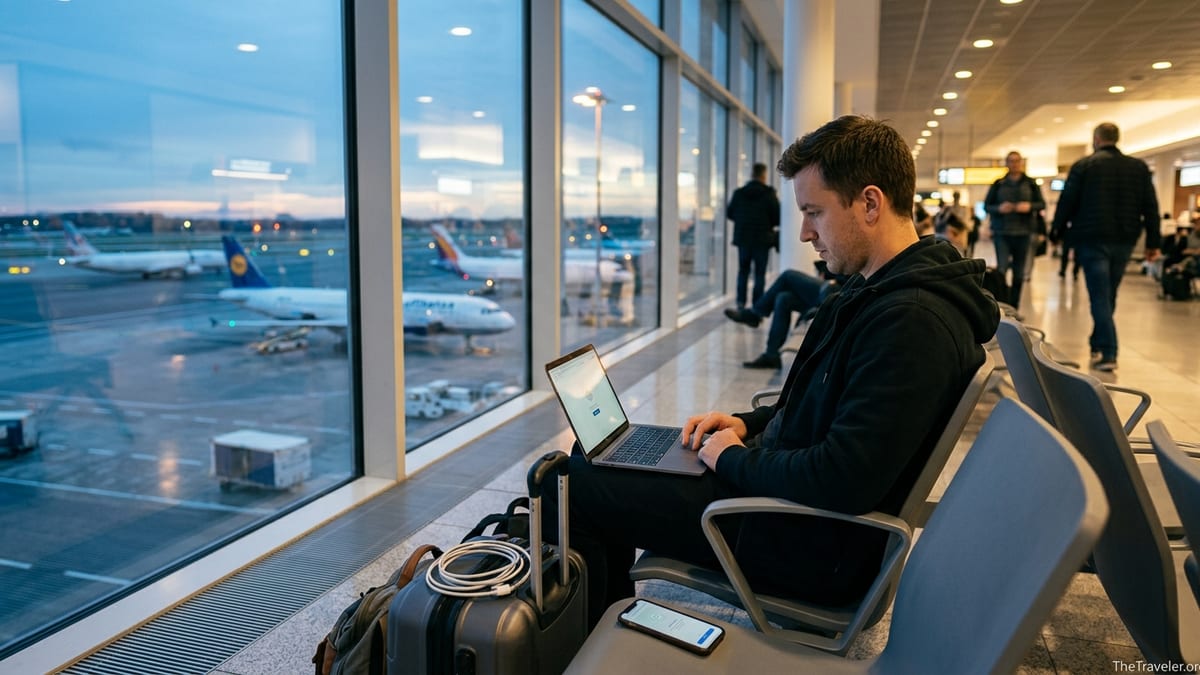
Why I Finally Turned NordVPN On While Traveling
The first trip when NordVPN really proved its worth was a week in Mexico City. At my hotel in Roma Norte, the Wi Fi was fast but clearly open to everyone. On my second night, a colleague messaged me that our company’s security team had flagged a login attempt to my email from a strange IP in Mexico. I had logged in from the lobby an hour earlier. That was the moment I actually opened NordVPN on my laptop instead of just telling myself I would "set it up later." I connected to a nearby server, the IP changed, and those warnings stopped appearing.
NordVPN works like most consumer VPNs: it creates an encrypted tunnel between your device and one of its servers, and websites see that server’s IP address instead of the café router in Hanoi or the guesthouse in Tbilisi. In practice, this meant I could keep using my banking apps, corporate email, and cloud storage without that anxious feeling when the network name was something like "FREE AIRPORT WIFI". I was still on public Wi Fi, but my traffic was at least shielded from whoever else happened to be sharing that network.
Legally, using a VPN is still allowed in most of the world, including the United States and the vast majority of European and Latin American countries, as long as you are not using it to commit crimes. Only a small group of governments have outright bans or very heavy restrictions on VPNs, and even there the risk is usually about circumvention of censorship rather than general security. That legal baseline is what made me comfortable leaving NordVPN on by default in most destinations.
What surprised me most on those first trips was how invisible it felt once it was running. On my MacBook and iPhone, the NordVPN app sat in the menu bar; I picked a nearby country, switched the toggle on, and forgot about it. My airline apps still worked, my cloud photo backup ran overnight, and video calls with family were no worse than when I connected directly.
Keeping Streaming & Subscriptions Working Across Borders
The next lesson came not from a security scare but from boredom. On a rainy evening in Lisbon, I opened Netflix on the apartment TV. The catalog looked completely different. The show I had been halfway through in New York had vanished from my "Continue Watching" row. I did not realize until then how aggressively streaming rights change from country to country.
With NordVPN on my laptop, I connected to a United States server and reloaded Netflix. My old watchlist reappeared instantly. The same thing happened with Hulu during a conference trip in Toronto, where some episodes were mysteriously unavailable until I switched my virtual location. Streaming platforms increasingly try to detect and block VPN traffic, and success can vary from service to service and week to week, but during my travels in 2024 and 2025 I found that NordVPN generally let me keep up with the same mix of platforms I paid for at home.
The same trick helped with sports. In a hostel in Valencia, a group of us wanted to watch an NBA playoff game that was not being shown on local TV. One traveler with a legal US streaming subscription logged into his account on his laptop, I fired up NordVPN, chose a server near Chicago, and we streamed the game on the common room projector. Without the VPN, the site only offered a condensed replay in Spain due to rights restrictions.
What made this workable in practice was the speed. In independent tests in early 2026, NordVPN ranked among the fastest consumer VPNs for local connections, with multi gigabit speeds on modern protocols, which matches my anecdotal experience of streaming HD and 4K video without buffering when connected to servers in the same region. I certainly noticed more slowdown on heavily congested café networks than I did from the VPN itself, which is not what I would have assumed before actually traveling with it.
Avoiding Banking Lockouts and Login Nightmares
If streaming made NordVPN nice to have, online banking made it non negotiable. Many banks and credit card companies treat foreign IP addresses as suspicious, which is understandable from a fraud perspective but infuriating when you are the one abroad. On my first trip to Eastern Europe, my US credit card app stopped working whenever I connected from a local SIM. I could not approve online purchases or verify new card transactions without a tedious phone call.
The workaround ended up being simple: I chose a NordVPN server in my home region before opening any financial app. From the bank’s perspective, I appeared to be logging in from the same general part of the United States I always did. The bank’s security still had plenty of other signals to check, but I stopped getting automatic lockouts just because I had flown across an ocean. This proved especially helpful in countries where my bank’s fraud team automatically flags card present charges as suspicious, like some first time transactions in Southeast Asia.
I saw the same pattern with services that hold money outside traditional banks. While renting a car in Prague, I needed to transfer a deposit via a US based payment app that can be sensitive to location. The clerk waited while I sat on their office Wi Fi repeatedly trying to authenticate. Only when I remembered to switch NordVPN to a US server did the verification screen stop looping and actually send the confirmation. These are small frictions, but when you are standing at a rental counter with a line of people behind you, they feel a lot larger.
This is also where simultaneous connections became relevant. As of 2026, one NordVPN account allows up to ten devices online at once. In practice, that meant I could have my phone, laptop, and tablet protected, plus share the account with my partner and still have a few slots left. We each set our banking apps to only open when the VPN was connected through servers in our home country, which kept those logins consistent no matter where the plane ticket said we were.
Public Wi Fi: From Afterthought to Priority
Before I started using NordVPN consistently, my rule for public Wi Fi was essentially "hope for the best." I would connect, type passwords, and trust that the padlock icon in my browser meant everything important was safe. Travel forced me to confront how messy these networks can be in reality. At a co working space in Chiang Mai, one of the noticeboard warnings was about a fake network with a nearly identical name to the official one. Several members had typed cloud logins into what turned out to be a rogue hotspot.
Turning on NordVPN did not magically fix the risks of insecure networks, but it changed the threat model in my favor. Instead of my traffic being visible to anyone with basic hacking skills on the same Wi Fi, it was wrapped in encryption to NordVPN’s servers first. This did not make phishing attacks or malicious websites disappear, but it did help against local snooping and basic eavesdropping on open networks, which are still common in hotels, malls, and airports from Dubai to São Paulo.
I also noticed fewer captive portal quirks when I used the VPN strategically. Many hotels and airports force you through a browser page where you enter a room number or click "I agree" before accessing the internet. If NordVPN was already on, those pages sometimes failed to load properly. I learned to connect to the network bare first, complete whatever form the hotel or airline required, and then enable the VPN. Once that sequence became habit, I stopped fighting with stubborn log in screens on every layover.
A side benefit was peace of mind for work. During a month long stay in Berlin, I was handling documents under a non disclosure agreement. My company did not require a VPN beyond our own systems, but knowing that my general internet traffic went first through NordVPN when I worked from cafés made me much less nervous about reviewing files and jumping on last minute calls.
Crossing Borders Where the Internet Changes Shape
The value of NordVPN jumped again when I started visiting countries with heavier internet controls. Landing in Istanbul, I found some social media services loading slowly or inconsistently. In parts of the Middle East, I discovered popular calling apps like WhatsApp or FaceTime did not work reliably on local mobile networks due to restrictions on internet calling. In China, whole clusters of sites from Western news outlets to Google services can be unreachable on the public internet.
Here a VPN can act less like a privacy tool and more like a survival kit for a connected life. Before a trip across the Caucasus, I installed NordVPN on my phone and laptop, tested connections to nearby European servers, and made sure the kill switch feature was enabled so that if the VPN dropped, sensitive apps would not silently fall back to the open network. When I reached a city where certain news sites loaded glacially or not at all, a quick switch of virtual location often restored access, as long as VPN use itself was not prohibited there.
This is where legality and local risk matter. While VPNs remain fully legal in most tourist destinations, some countries either ban them outright or limit usage to government approved providers. Laws and enforcement vary and change, but recent overviews consistently list nations such as China, Russia, Iran, Turkmenistan, and Myanmar among those that restrict or criminalize unauthorized VPN use in some way. In such places, the priority shifts from convenience to caution. The responsible approach is to read up on the current legal situation before you travel, decide your risk tolerance, and remember that your safety always outweighs the convenience of accessing a blocked app.
In more moderately restrictive countries, VPNs live in a gray zone: technically legal for security, frowned on or policed when used to dodge censorship or gambling rules. Governments in parts of the Middle East and South Asia, for example, have introduced regulations that require VPN providers to cooperate with certain blocking orders or remove local servers that do not comply. As a traveler, I avoided drawing attention by not boasting about using a VPN, keeping my usage limited to basic browsing, and respecting clear local laws around banned sites.
Costs, Plans, and When NordVPN Is Actually Worth It
The practical question is whether NordVPN is worth paying for if you are primarily buying it for travel. In 2026, public pricing for NordVPN’s Standard plan typically works out to the equivalent of a few US dollars per month if you choose a multiyear subscription, with monthly billing still noticeably more expensive. Exact figures change with promotions and currency, but the pattern is consistent: the lowest headline prices only show up on the longest plans, while renewal rates are higher than the initial discount.
For me, the calculus shifted once I started traveling internationally two or three times a year and working remotely for weeks at a time. The cost of a year of NordVPN was less than a single international checked bag fee on many airlines, and significantly less than what a day of lost work would have cost me if I had been locked out of a key account abroad. Framed that way, it felt more like travel insurance for connectivity than a tech luxury.
The ten device limit per account had tangible value as well. On one family trip to Italy, we protected four phones, two laptops, a tablet used for kids’ streaming, and even a travel router plugged into an Airbnb modem, all under one subscription. It meant we did not have to constantly sign devices in and out as we hopped from one network to another across Florence, Rome, and Naples.
If you only take a short overseas trip every few years, it might make more sense to subscribe shortly before departure and cancel afterward, or time a one year plan to cover a busy travel period. NordVPN’s apps are quick to install on both desktop and mobile platforms, so there is no special setup required beyond creating an account, logging in, and choosing a server. What matters is that you do this before you board the plane, while your home phone number still works easily for two factor authentication.
Practical NordVPN Habits I Picked Up on the Road
Using NordVPN while traveling ended up being less about individual features and more about small habits that made my digital life smoother overseas. One of the most useful was setting up favorites. Before a long trip, I would mark a few servers near my home city, plus several in travel hubs like London, Amsterdam, and Singapore. That way, when I needed a stable low latency connection for a video call or banking login, I did not have to scroll through a long list of countries at a crowded gate.
I also learned to pair NordVPN with device security basics rather than treat it as a magic shield. On my phone and laptop, I kept full disk encryption on, enabled biometric logins, and used a password manager with two factor authentication. The VPN added a layer of privacy on untrusted networks and helped with geo specific services, but it sat within an overall security posture that assumed devices might be lost, stolen, or briefly accessible to others in shared spaces.
Another habit was mental: remembering that some services do not like VPN traffic and may block or challenge it. Government websites, ticketing platforms for certain events, and a handful of banks in Europe were more likely to show "Error" pages when I appeared to be coming from a shared VPN IP address. In those cases, temporarily disconnecting NordVPN, completing the transaction on a home or mobile network, and then reconnecting was the most efficient path. Knowing when to turn it off mattered almost as much as remembering to turn it on.
Finally, I made a point of updating the NordVPN app before major trips. Providers regularly add and remove servers, tweak protocols, and adjust how they route traffic in response to new blocks and technical changes. Installing the latest version at home, then doing a quick test connection from my living room, spared me troubleshooting mysterious connection issues for the first time in a foreign hotel after midnight.
The Takeaway
I started traveling with NordVPN on my devices almost as an afterthought. It was one more subscription I was not sure I really needed. After a few years of trips across Europe, Asia, and Latin America, it has become a tool I feel distinctly uneasy leaving behind. Not because it guarantees anonymity or perfect security, but because it handles a cluster of small, very real travel problems so reliably that I barely think about them anymore.
It keeps my logins and banking more predictable across borders, smooths over streaming rights headaches on rainy evenings, and gives me a fighting chance at a usable internet connection in places where the web is chopped up by geography or local politics. It also nudged me into better digital hygiene in general: treating public Wi Fi as untrusted by default, learning where VPN use is sensitive, and planning my connectivity with almost as much care as I plan my flight routes.
If you rarely leave your home country, NordVPN may feel optional. But if your passport sees regular use, or you are increasingly living a location independent life, having a reliable VPN in your toolkit is less about being tech savvy and more about being a prepared traveler. For me, NordVPN turned out to be one of those quiet essentials I did not fully appreciate until it repeatedly saved me from hassles I had not even known to expect.
FAQ
Q1. Is it legal to use NordVPN while traveling abroad?
In most countries, including the United States, Canada, and most of Europe, using a VPN like NordVPN is legal for personal privacy and security as long as you are not using it to commit crimes or access clearly illegal content. A small number of countries heavily restrict or ban unauthorized VPNs, so it is important to check the current rules of your destination before you travel.
Q2. Will NordVPN let me access my US streaming services overseas?
Often it will, but it is not guaranteed. Many travelers successfully use NordVPN to watch services registered in their home country by connecting to servers there, but streaming platforms constantly update their systems to detect and limit VPN traffic. Results can vary by service and even day to day, so you should view this as a convenience feature rather than something you can rely on in every destination.
Q3. Can NordVPN stop my bank from locking my account when I log in abroad?
Using NordVPN to connect through a server in your home country can reduce the chance that your bank flags a login just because it appears to come from overseas. However, banks use many signals to detect fraud, and they may still challenge or block activity for other reasons. You should always tell your bank about major trips when possible and keep backup ways to verify your identity.
Q4. How many devices can I use with one NordVPN account while traveling?
As of 2026, NordVPN allows up to ten devices to be connected at the same time on a single subscription. That is usually enough to cover a traveler’s phone, laptop, tablet, and a few extra devices for family members or a travel router, without having to constantly sign in and out.
Q5. Will NordVPN make hotel and airport Wi Fi completely safe?
No tool can make any network completely safe, but NordVPN significantly reduces some common risks on public Wi Fi by encrypting your internet traffic between your device and its servers. This helps protect against people on the same network trying to snoop on unencrypted data. You still need to watch out for phishing, fake login pages, and malicious downloads, and you should combine the VPN with good password and device security practices.
Q6. Does using NordVPN while traveling slow down my internet?
Any VPN adds some overhead because your traffic is being routed through an extra server, but NordVPN is designed to keep that slowdown as small as possible. On decent hotel or café connections, many travelers find they can stream video, make video calls, and browse normally with the VPN active, especially when connected to a nearby server. On very weak or congested networks, the local Wi Fi quality will usually be a bigger bottleneck than the VPN.
Q7. Should I always leave NordVPN on when I am abroad?
For many travelers, leaving NordVPN on by default is a good habit, especially on public Wi Fi. However, some sites and apps, including certain government services, ticketing platforms, or local banking apps, may not work properly with a VPN connection. In those cases, it can make sense to briefly turn NordVPN off, complete the task on a trusted network such as your mobile data, and then turn it back on afterward.
Q8. How do I choose which NordVPN server to use on a trip?
For general browsing and security, it is usually best to pick a server in the country you are physically in or in a nearby region, since that often gives the best speed and latency. When you need an app or website to think you are in your home country, choose a server there instead. Many travelers mark a few favorite servers near home and in major hubs before a trip so they can switch quickly as needed.
Q9. Can NordVPN help me bypass internet censorship in restrictive countries?
Technically, NordVPN can sometimes restore access to blocked sites and services by routing your connection through a server in a more open internet environment. However, in countries where VPN use is banned or tightly controlled, doing so may violate local law and carry real risk. You should carefully research the legal and safety implications before relying on any VPN for circumvention and always prioritize your personal safety over accessing specific sites.
Q10. Is NordVPN worth paying for if I only travel occasionally?
If you take a short international trip every few years, you may be able to subscribe just before you travel and cancel afterward, or use a one year plan to cover a busy period of trips. For frequent travelers, digital nomads, or remote workers who spend significant time abroad, the cost of NordVPN is often outweighed by the value of smoother banking logins, more reliable access to familiar services, and added protection on countless hotel, café, and airport networks.