


Airfare pricing has always felt mysterious, but in 2026 travelers have a powerful new ally: artificial intelligence. Used well alongside Google Flights, AI tools can sift through thousands of options, watch fares around the clock and highlight savings a typical search would miss. Used poorly, they can send you chasing phantom bargains or complicated routings that cost you more in the long run. This guide focuses on what actually works in real-world testing, with concrete examples of how to combine AI, Google Flights and a few trusted apps to consistently find cheaper flights.
Get the latest updates straight to your inbox!
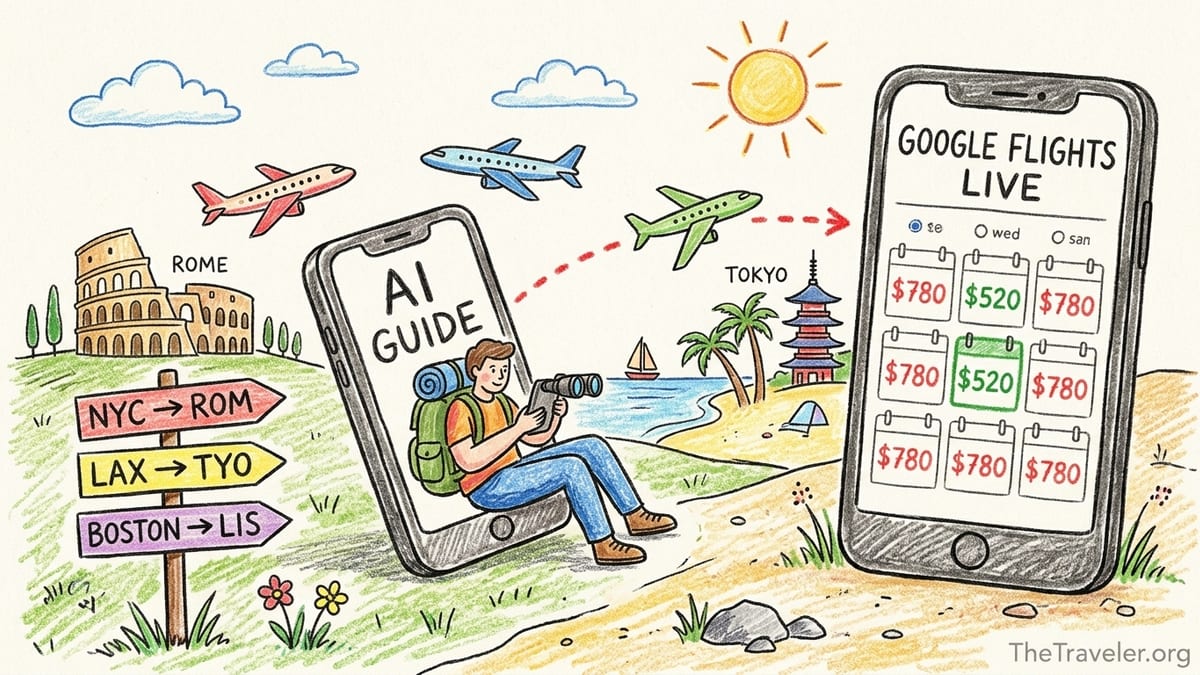
Start With Google Flights as Your Live Price Source
Whatever AI tools you use, Google Flights remains one of the most reliable live sources for airfare prices and routing options. Travel testers who compared AI agents with human searches consistently use Google Flights as a benchmark because it pulls in fares from many major airlines and online agencies and shows a clear date grid of prices. A common pattern in recent trials is that an AI assistant will suggest routes and timing strategies, then the traveler uses Google Flights to check actual prices and availability before booking.
Imagine you are flying from New York to Rome in March. You ask an AI assistant for the cheapest dates within a seven day window and it recommends leaving on a Tuesday instead of Saturday. When you plug that into Google Flights, you might see a round trip with a major carrier around 520 dollars for Tuesday to Tuesday, compared with 780 dollars for the Saturday to Saturday dates. The AI helped you focus on the cheaper travel days, but the final verification and exact number came from Google Flights.
Google Flights is especially useful for showing nearby airport options in one view. For a trip from Los Angeles to Tokyo, for example, you can see prices not just from Los Angeles International but also from smaller airports like Ontario or John Wayne and into both Narita and Haneda. AI tools can suggest “consider flights into Haneda for better schedules” or “check LAX and San Diego for departures,” but it is Google Flights that lets you compare those options with live prices in a few clicks.
Because AI models sometimes rely on cached or indirect fare data, they may occasionally quote prices that look excellent but no longer exist. Using Google Flights as your truth source avoids this problem. Treat any price an AI suggests as a lead, not as a confirmed deal, and always run the route and dates through Google Flights or a similar live search engine before you pull out your credit card.
Use AI to Design Smarter Search Strategies
Where AI shines is not in replacing Google Flights but in shaping how you search. Instead of guessing at dates and routes, you can ask an AI tool to analyze patterns, suggest alternative airports and outline the trade offs between different itineraries. For instance, travelers have used AI prompts like “compare typical prices for Boston to Lisbon in April, May and June and suggest the cheapest month with tolerable weather” to get a narrative explanation of seasonal price trends before they start searching.
In one real example published by an independent travel blogger, an AI assistant helped a traveler avoid paying roughly 800 dollars more by restructuring the itinerary. The original plan was a simple round trip from San Francisco to Athens in August, which was pricing around 1,400 dollars on major search engines. After feeding the route, dates and budget into an AI assistant, it suggested splitting the journey and routing via a cheaper European hub. The traveler ultimately booked a San Francisco to Paris round trip for about 750 dollars, then a separate Paris to Athens round trip for around 250 dollars, saving several hundred dollars even after adding one overnight in Paris.
Another tested use of AI is brainstorming airport and airline combinations you may not know. A traveler heading from Chicago to Bali asked an AI assistant for routings that allowed at least one long layover in a city with good lounge access and minimal risk of missed connections. The assistant recommended looking at Chicago to Singapore on a major alliance carrier and then a separate low cost flight from Singapore to Bali, as well as alternatives via Tokyo and Seoul. When the traveler checked these ideas in Google Flights, the suggested Chicago to Singapore route in shoulder season showed fares under 900 dollars, compared with over 1,300 dollars for many one ticket Chicago to Bali options.
AI is also helpful when you have flexibility. If you tell an assistant “I can leave any time in the first two weeks of May for ten days, from any New York area airport to Barcelona, and I prefer nonstop or one stop only,” it can narrow that to a handful of promising date ranges and carriers. You then plug those into Google Flights’ calendar view to find the lowest fare within each AI suggested window. This division of labor saves you from guessing and re entering dozens of combinations by hand.
Make the Most of Google Flights Price Tracking
Google Flights offers built in price tracking that can send you email alerts when the fare on a route changes. A 2026 guide from a major flight deal service notes that consistently setting alerts on Google Flights, Skyscanner and similar tools is one of the most effective ways frequent travelers find cheap tickets, more so than searching at a supposedly perfect time of day. Once you identify a reasonable itinerary, toggling price tracking on for your preferred dates and flexible alternatives lets Google do the watching for you.
Price alerts become powerful when you apply them systematically. Suppose you want to fly from Dallas to London in October. In Google Flights you might track three separate variations: Dallas to London nonstop for your exact dates, Dallas to London with one stop across a three day window on either side, and Dallas to nearby European hubs like Dublin or Paris for the same week. In practice, travelers often see the one stop or alternative hub alerts drop first. You might receive an email showing Dallas to Dublin for around 480 dollars round trip, when your original Dallas to London nonstop dates are still above 800 dollars. With that alert in hand, you can decide whether booking Dallas to Dublin and a separate short hop to London saves enough to be worth the extra leg.
Some AI powered apps now build on Google Flights style tracking by adding explanations. Services highlighted in recent travel tech roundups monitor routes and send notifications not only when the price drops, but also whether the deal is better or worse than historic averages. For example, you might see an alert that a Los Angeles to Tokyo fare around 620 dollars is significantly below the typical 800 to 900 dollar range for that time of year, along with a recommendation to book soon rather than waiting for a further drop that may never come.
While prediction tools that promise to tell you the perfect moment to buy can be hit or miss, using price tracking across multiple tools is reliably helpful. Travelers who track a route on Google Flights, then set additional alerts in apps like Hopper or Kayak, often receive slightly different offers and timing. It is not unusual to see Google Flights show a New York to Miami fare dropping from about 260 dollars to 190 dollars while a separate alert from another app arrives the next day highlighting a limited time sale around 175 dollars on a specific carrier. Using several trackers together, with Google Flights as your reference, increases your odds of catching these short lived dips.
Best AI Flight Tools Available in 2026
A growing set of AI enhanced tools can work alongside Google Flights to surface deals faster. One airline search guide published in 2026 compared several options, including Skyscanner’s conversational search features, Hopper’s predictive tools, Kayak’s Ask AI interface, and independent fare alert services that frame their recommendations with AI powered analysis. The key is to understand what each tool actually does rather than assuming any label with “AI” automatically means better prices.
Skyscanner, for example, introduced discovery tools that let you describe a kind of trip in natural language and receive destination suggestions and price ranges. Travelers in the United States and Europe have reported using prompts like “find me a long weekend trip in January from Chicago to anywhere warmer than 70 degrees for under 400 dollars” and receiving a shortlist of cities such as Miami, Cancun and San Juan along with approximate fares. From there, they still verify everything on Google Flights or the airlines directly, but the AI summary saves them manually testing dozens of cities.
Hopper uses models trained on past price movements to advise whether you should buy now or wait. For instance, for a Seattle to Honolulu trip in shoulder season, Hopper might show a current fare around 520 dollars and label it as “likely to drop,” recommending that you wait. If the price later dips under 450 dollars, the app can send a notification suggesting that it is time to book. Testing by travel writers shows that this advice is roughly accurate more often than not, though it is not perfect. The safe way to use it is as one extra signal alongside your own budget and the data visible in Google Flights price graphs.
Kayak’s Ask AI feature integrates natural language search into a familiar interface. A traveler might type “find me flights from Boston to Los Angeles leaving after 5 p.m. on Friday and returning Monday night, with decent legroom and total price under 350 dollars,” and see Kayak translate that into specific filters. In independent trials, this reduced the back and forth of applying filters manually and helped expose secondary airports and airline options that met the criteria.
There are also specialist services and experimental agents that plug directly into flight search engines through official connections, sometimes marketed as custom travel agents inside AI platforms. In one widely discussed case, a user connected an AI powered agent to multiple search sites and claimed savings of around 150 dollars on a multi city European itinerary by having the agent test dozens of combinations automatically. In these situations, the technology is performing at scale what a determined human could do by hand, but far more quickly. As always, the traveler still reviewed each proposed itinerary and completed payment on the airline or a recognized booking site.
Real Examples of AI and Google Flights Working Together
Recent public tests offer practical examples of how AI and Google Flights can complement each other. A technology writer comparing several AI systems asked each one to find the cheapest round trip weekend flight from Boston to a major U.S. city within a two month window. An AI system integrated with Google Flights located a fare in the high 60 dollar range for a short haul round trip that departed on a Saturday instead of the requested Friday, explaining that moving one day later unlocked a much lower price. When the tester manually checked in Google Flights, the Saturday Sunday pairing did indeed show a fare under 70 dollars, while Friday Sunday options were more expensive.
Another tester used an AI assistant connected to Skyscanner to search for flights from London to Lisbon in autumn. The AI produced a ranked list of options, including one around 340 dollars cheaper than the best fare the tester had seen in an earlier Google Flights search when using stricter filters. The AI suggested relaxing the departure time window and allowing a slightly longer layover, which exposed an evening flight on a different carrier that the original filters had hidden. Once alerted to that option, the traveler verified the exact price and schedule in Google Flights and then booked directly with the airline.
Travel communities have also documented how AI can catch overlooked alternatives in regional markets. One user searching for flights from a midwestern U.S. city to Orlando set tight arrival time filters on a traditional search site and saw the cheapest fare from a major legacy carrier at a little over 200 dollars. When they asked an AI assistant to propose any viable routings arriving before mid afternoon, it included a low cost carrier option arriving ten minutes later than the original cutoff, with a fare advertised around 99 dollars. After checking the carrier’s own site and confirming that the flight actually existed and allowed full credit on cancellation, the traveler saved roughly half the cost in exchange for a minor adjustment to arrival time.
These examples share a pattern: the AI suggests new angles and catches human blind spots, but the traveler still cross checks on Google Flights and the airline. The savings tend to come from smarter flexibility and awareness, not from secret unpublished fares that only AI can see.
Common Booking Mistakes AI Cannot Fix for You
Even the smartest AI tools cannot protect you from every booking mistake. If you blindly follow suggestions without understanding basics about fares and rules, you can end up spending more. One frequent issue highlighted by travelers testing AI flight tools is ignoring the true cost of baggage and seat fees. An AI may surface a basic economy fare from New York to Los Angeles for around 180 dollars that looks cheaper than a 230 dollar standard economy fare on a competing airline. Once you add a checked bag fee, a carry on fee and a seat selection charge, the 180 dollar ticket can easily surpass 260 dollars, while the 230 dollar fare on another carrier includes at least a carry on and a seat assignment.
Another pitfall is trusting AI suggestions for complex self transfer itineraries without enough time buffer. Some AI tools are comfortable recommending separate tickets booked through different airlines and agencies to stitch together the cheapest route. For example, it might pair a Chicago to New York ticket on a low cost carrier and a separate New York to Madrid ticket on another airline with only an hour and a half between flights. If your first flight is delayed, the second airline may treat you as a no show with no protection. Travelers have reported that while AI can calculate these combinations quickly, it does not always fully explain the connection risk unless you ask explicitly for safe minimum layover times and protected connections.
Hidden fees and refund rules are another area where human attention still matters. Reviews of AI flight search tests on public forums consistently point out that even when AI agents return correct schedules and base prices, you must click through to the airline or agency site to read fare conditions. A ticket may be labeled as changeable, but only for a fee and only as a credit, not a refund. For a 400 dollar ticket, a 200 dollar change fee may wipe out any savings you thought you gained from clever routing.
Finally, avoid the temptation to treat AI generated itineraries as completely personalized bargains. Several travelers who let AI control their filters without supervision ended up with marathon journeys, such as 30 hour routings with two overnight layovers, to save 80 or 100 dollars compared with a reasonable one stop option. Before accepting any suggested itinerary, ask yourself whether the time cost, sleep disruption and added risk of delays is worth the nominal savings.
Practical Workflow: Step by Step to Cheaper Fares
Bringing the pieces together, it helps to follow a repeatable workflow that uses AI and Google Flights for what each does best. Start with an AI assistant to clarify your priorities and surface strategies. For instance, tell it you are planning a June trip from Toronto to Barcelona, can be flexible three days either side, have a budget around 700 dollars and are willing to connect once but not more. Ask it which weeks in June tend to be cheapest, which European hubs might offer lower fares and how prices usually differ between flying from Toronto and nearby airports such as Montreal.
Next, move to Google Flights and test the core ideas you received. Use the date grid and price graph to scan a full month and confirm whether the AI was right that departing midweek is cheaper, or that flying into a nearby city such as Madrid or Paris significantly undercuts Barcelona on your dates. Turn on price tracking for the best few options you find, spanning your ideal itinerary and at least one backup plan.
Then, add targeted AI tools for monitoring and refinement. If you use an app like Hopper, create a watch on your main route and see whether it recommends buying now or waiting based on its predictions. If you like Kayak’s or Skyscanner’s AI features, run a similar query there to make sure you are not missing a carrier or connection that Google Flights has not highlighted as prominently. When an alert arrives showing, for example, a Los Angeles to London fare dropping under 500 dollars in shoulder season, check that against your budget and calendar and be prepared to book quickly.
Throughout this process, keep a human checklist for the final booking: verify baggage and seat fees, check total travel time and layover risk, read the change and refund rules, and confirm that you are booking directly with the airline or a reputable agency. If an AI generated itinerary involves multiple tickets, consider whether the savings truly outweigh the added complexity and lack of protection. Many experienced travelers who adopt this workflow report consistent reductions of 15 to 30 percent on long haul trips compared with their earlier habit of quickly accepting the first reasonable fare they saw.
Conclusion: Let AI Guide You, but Let Prices Decide
AI tools have changed how travelers search for flights, but they have not replaced the need for judgment and verification. The strongest results come when you treat AI as a strategist that suggests dates, routes and trade offs, and treat Google Flights as your live dashboard for actual prices and options. Together, they can reveal cheaper itineraries, highlight flexible dates that save hundreds of dollars and reduce the time you spend clicking through calendars.
The real value is not in secret hacks, but in combining machine driven pattern recognition with human priorities. Ask AI to explore creative routings, seasonal trends and alternative airports. Use Google Flights to test those ideas, track fares and book with confidence. Pay careful attention to baggage, fees and fare rules, and do not let a computer talk you into a 30 hour journey to save a small amount of money. With this balanced approach, the mix of AI tools and Google Flights can become one of the most reliable parts of your travel planning toolkit.