


For many travelers landing in Manila, the first stressful moment is not immigration or baggage claim. It is standing on the curb at Ninoy Aquino International Airport (NAIA), luggage in tow, trying to figure out where your Grab car is allowed to pick you up. In recent years the airport operator and Grab have changed pickup rules, opened a central hub at Terminal 3 and reconfigured bays at Terminal 1. This guide explains, in practical detail, how to navigate the booths, bays and new systems so you can get from the airport to the city with minimal hassle.
Get the latest updates straight to your inbox!
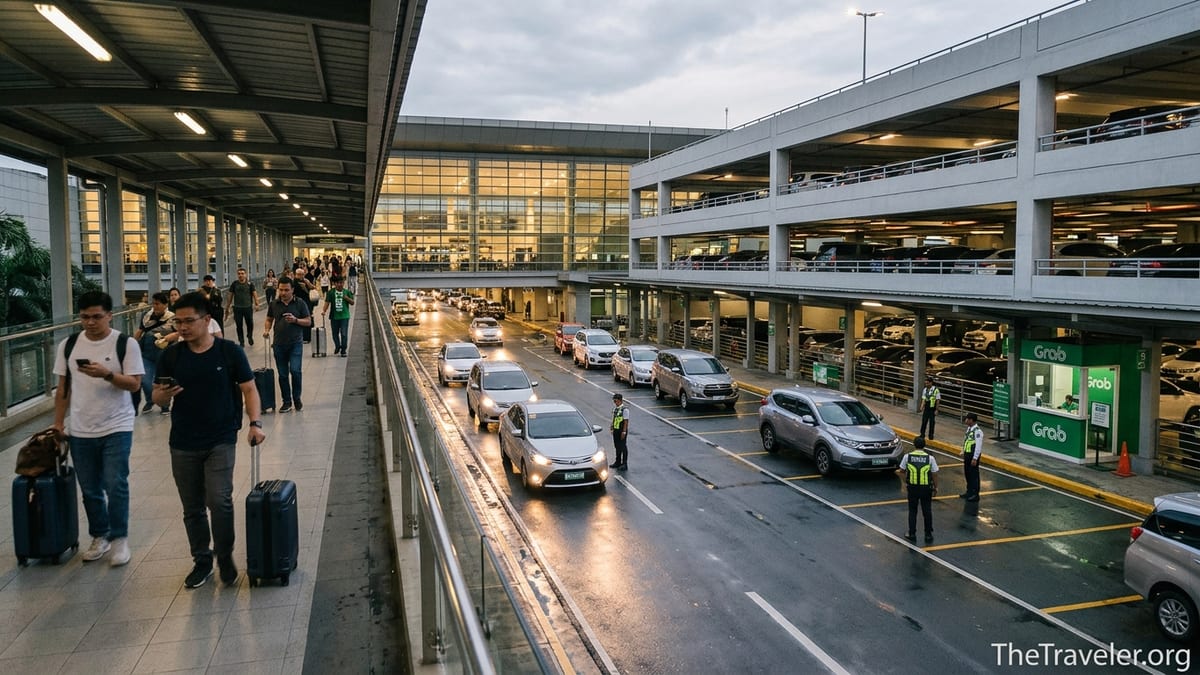
How Grab Works at NAIA Today
Grab is the dominant ride‑hailing app at Manila’s NAIA and is one of only a handful of accredited transport network vehicle services allowed to pick up at the terminals. The airport’s private operator has pushed pickups away from the crowded curbs and into more controlled areas, including a centralized ride‑hailing and taxi hub at Terminal 3 used by Grab and other app‑based services. The result is a system that is safer and more orderly than a few years ago, but also more confusing for first‑time visitors who expect to simply step out of arrivals and jump into their car.
At all terminals, the basic rule is the same: you book via the Grab app on your phone, then meet the driver at a designated pickup point. Depending on the terminal, that point might be a specific arrival bay like A1 or A3, a Grab booth near the tourist information center, or the multi‑level parking structure next to Terminal 3. Staff at the official Grab booths can create a booking for you if you do not have mobile data or are struggling with the app, and there are airport security personnel managing vehicle flow at the main pickup zones.
Because NAIA is busy and traffic is unpredictable, you should not request a ride until you have your bags in hand and know which exit and bay you will use. A typical mid‑afternoon GrabCar from NAIA to Makati can arrive in 5 to 15 minutes outside peak times, but in the late evening rush when multiple wide‑body flights arrive together, it can take longer for your driver to reach the pickup bay or hub, especially at Terminal 3.
Officially, only accredited services may pick up at the terminals, but in practice you will sometimes see private vehicles pulling into the same bays to collect relatives and friends. As a visitor, you are far better off sticking to Grab or other accredited options; incidents of overcharging and scams have tended to involve unaccredited taxis or informal operators, not rides booked in the app where the fare is known in advance.
Terminal 1: Arrival Bays and Grab Booths
Terminal 1 handles many long‑haul international flights, so it is often a traveler’s first exposure to the Manila traffic system. After clearing immigration and customs, you exit into arrivals and will see signs toward the tourist information counter and transport options. Grab’s official instructions direct arriving passengers toward the tourist information center and then out to the marked pickup point near the arrival bays labeled A1 through at least A4, which are used as meeting spots for private vehicles, airport taxis and ride‑hailing cars.
In the past, Terminal 1 had a clearly marked Grab booth at the arrivals curb. Frequent travelers report that the exact position and visibility of the booth has changed with terminal renovations and the reconfiguration of the main arrival curb, which was opened up to all private vehicles after previously being reserved for VIPs. Today you are more likely to see Grab staff or signage near the standard arrival bays, and private cars, metered taxis and ride‑hailing vehicles share the same general zone instead of using a completely separate platform.
In practical terms, the safest strategy at Terminal 1 is to follow these steps: once you pass customs, connect to airport Wi‑Fi or your roaming data, open Grab and set your pickup location as “NAIA Terminal 1” then choose the specific arrival bay that matches the signage in front of you, for example “Arrival Bay A1” or “Arrival Bay A3.” Walk outside only after your booking is confirmed, find the correct lettered bay, and message the driver through the app to say “Waiting at Bay A1 in front of Terminal 1 arrivals, wearing a blue shirt and black suitcase.” This level of detail is important because several cars may be pulling through the same space at once.
If you do not have mobile data, look for the tourist information area and ask staff to point you to the Grab booth or booking desk. There, agents can assist with creating a ride using a booth device and will tell you exactly which bay to walk to. This avoids the situation where you exit to the curb, turn left and right without understanding the bay system, then have your driver circle repeatedly while you try to describe your location over a weak call connection.
Terminal 2: Domestic and International, Same Basic Rules
Terminal 2 is used heavily by Philippine Airlines and handles both domestic and international flights. The layout is more compact than Terminal 3 but still has a clear separation between arrivals and departures levels. Grab’s airport page indicates a Grab booth in Terminal 2, and in practice travelers report a similar process to Terminal 1: go through baggage claim, exit toward arrivals and tourist information, then proceed to a designated pickup zone where Grab cars are allowed to stop.
Because Terminal 2 hosts many domestic flights with shorter turnaround times, one source of confusion is that travelers sometimes assume they can treat it like a small regional airport and simply book a Grab while still on the aircraft taxiing to the gate. That is risky in Manila. Bags can take time to reach the carousel, and immigration queues for returning overseas Filipinos or international passengers vary considerably by time of day. Booking too early may result in a frustrated driver who reaches the curb long before you are ready and may cancel the ride, potentially affecting your account rating and forcing you to pay a small cancellation fee.
A more realistic approach is to wait until you see your luggage on the carousel or have already picked it up. A typical GrabCar from Terminal 2 to a Pasay City hotel might show an estimated fare of around 220 to 300 pesos in normal traffic, rising to 350 to 450 pesos during heavier congestion. To BGC or Ortigas, the estimated range could be 350 to 600 pesos depending on the time of day and whether you choose a standard GrabCar or a larger GrabCar 6‑seater to handle extra passengers and bags.
As at Terminal 1, if you are unsure about the pickup bays, ask an airport guard or information staff specifically, “Where is the Grab pickup point?” and confirm the bay letter and any landmarks, such as “near the overhead sign ‘Public Transport’” or “beside the metered taxi line.” Then match that landmark with what you see in the app map to reduce the chance of standing at the wrong curb while your driver waits in another section of the roadway.
Terminal 3: Centralized TNVS Hub and How to Reach It
Terminal 3 is the largest and busiest terminal at NAIA, handling many full‑service and low‑cost carriers on both domestic and international routes. To relieve curbside chaos, the airport operator opened a centralized transport hub for transport network vehicle services at the multi‑level parking building beside Terminal 3. App‑based services like Grab and a growing list of competitors use this hub, along with metered taxis and some shuttle options. The hub has multiple loading bays and dedicated lanes, which improves flow once you understand how to get there from arrivals.
For arriving passengers, this hub means you will usually not meet your Grab directly outside the sliding doors of the arrivals hall. Instead, you follow overhead signs pointing to the multi‑level parking or “TNVS / Grab pickup,” walk along a covered connector toward the parking structure, then descend to the level where the hub operates. This walk can feel unexpectedly long after a red‑eye flight: travelers report that it takes 5 to 10 minutes at a normal pace, including navigating escalators or ramps while pulling luggage.
Inside the hub, there are clearly marked loading bays where marshals coordinate vehicle movement. Grab cars queue in a holding area and are called forward to specific bays to pick up passengers. If you booked your ride from inside the arrivals hall, the app will usually instruct you to proceed to this transport hub and may show an internal map. A good practice is to wait to confirm the ride until you are near the entrance to the hub; that way, your driver is not waiting long in the queue while you are still walking from baggage claim.
As an example, imagine you land at Terminal 3 at 8 p.m. on a Friday and are heading to a hotel near Greenbelt in Makati. After collecting your bags, you follow signs to the TNVS hub and, once you are on the correct level, open Grab and request a standard GrabCar. The estimated fare might show around 260 to 380 pesos at that time, but if heavy rain has slowed traffic or several large flights just landed, surge pricing may lift the estimate closer to 450 or 500 pesos. It is common to wait 10 to 20 minutes from booking to actually sitting in the car during these peak evening windows.
Understanding Grab Pricing, Surge and Sample Fares
Grab uses dynamic pricing at NAIA. The fare you see before you confirm includes a base fee, a per‑kilometer and per‑minute component, and sometimes additional airport surcharges that can vary over time. You will notice that prices are significantly higher during the evening peaks, holiday periods and whenever heavy rain slows the city’s notoriously dense traffic. On the other hand, mid‑morning and mid‑afternoon on weekdays can produce surprisingly reasonable fares for an airport ride in a major Asian capital.
From NAIA to close‑in districts such as Pasay and some parts of Paranaque, it is common to see GrabCar estimates in the 200 to 280 peso range in lighter traffic, sometimes under 200 pesos during very quiet times. To Makati’s central business district, rough estimates tend to fall somewhere between 250 and 450 pesos depending on time and demand, while trips to Bonifacio Global City or Ortigas might range from 320 to 600 pesos. Journeys to Quezon City or the northern suburbs can exceed 700 pesos in peak conditions, particularly if you opt for a larger vehicle class or have toll roads enabled in your route.
Surge pricing at NAIA is often most noticeable late at night when many international flights from North America, the Middle East and Europe arrive within a short window. Travelers report opening Grab at 10:30 p.m. after clearing customs on a busy weekend and seeing a Makati fare that would normally cost around 300 pesos spike to something closer to 600 or even 700 pesos. In these situations, waiting 15 to 20 minutes for demand to cool or walking to a nearby airport café, refreshing the app periodically, can sometimes bring the fare back down into a more normal range.
Because the fare calculation is transparent in the app, comparing Grab with other options is straightforward. Yellow airport taxis, which are regulated and metered, can be competitive for short distances but are susceptible to traffic‑related meter creep and occasional overcharging incidents. Fixed‑fare “coupon” taxis and private hotel cars may cost several times more than a GrabCar for the same route but offer the certainty of a static quote in advance. A typical first‑time visitor strategy is to check the Grab estimate on their phone as a benchmark, then decide whether to accept or decline offers from other transport providers in the arrivals area.
Luggage, Vehicle Types and When to Upsize
NAIA passengers, especially those on long‑haul flights into Terminal 1 or Terminal 3, often arrive with bulky luggage. In the Grab app, the default option “GrabCar” is generally designed for up to four passengers with two medium suitcases and a couple of smaller bags. If your group is larger or you are carrying surfboards, golf bags or multiple large boxes, you should consider selecting a 6‑seater or similar larger vehicle category that is explicitly described as accommodating more passengers and luggage.
A concrete example helps: two adults arriving from Dubai with one large suitcase each and two cabin bags will usually be fine in a standard GrabCar sedan from Terminal 3 to Makati. Four adults arriving from Los Angeles with four large checked bags and four carry‑ons will find that a standard sedan is cramped and may be rejected by drivers who are concerned about both comfort and safety. In that second scenario, requesting a GrabCar 6‑seater or similar class increases the fare, perhaps from 350 pesos to around 550 or 650 pesos for a typical city‑center destination, but significantly reduces friction at pickup.
Remember that you must be able to load your luggage quickly when your driver pulls into the assigned bay. NAIA marshals in the hubs and curbside areas are under pressure to keep traffic flowing, so cars cannot linger while passengers repack bags or debate seating arrangements. Before you reach the pickup point, mentally assign who will load which suitcase and confirm within your group that everyone can handle their own hand luggage. This is especially important if there are children or older relatives traveling with you.
If you know in advance that you will be traveling with oversize sports gear or a large amount of checked baggage, it is worth noting a backup plan. Some travelers arrange a private van in advance through their hotel or a local transport company, then use Grab only for shorter intra‑city moves. Others ship part of their luggage as cargo to avoid squeezing everything into a sedan. Grab is flexible, but NAIA’s busy bays and hubs reward those who plan just one step ahead.
Common Pickup Confusions and How to Avoid Them
Most of the stress around Grab at NAIA comes from miscommunication about location. At Terminal 1, travelers often mix up the main arrival curb and any temporary extensions or side bays created during construction phases, then drop a generic pin in the app that does not match where they are physically waiting. At Terminal 3, the confusion is typically about the centralized hub: many first‑timers assume they will meet their car right at the arrivals curb, do not realize pickups are in the multi‑level parking, and consequently watch in frustration as their driver’s car icon circles a nearby ramp while they stand outside the wrong door.
To avoid this, always use the preset location labels in the Grab app that mention “NAIA Terminal X” together with a specific bay or the “TNVS hub” where available, instead of manually dropping a pin on the map. Once your ride is confirmed, send the driver a short in‑app message including both your terminal and your visible landmark: for example, “At NAIA T3 TNVS hub, Bay 6, near the marshals in yellow vests” or “At NAIA T1, Arrival Bay A2, under the sign that says Public Arrivals.” This small habit dramatically increases the success rate of smooth first‑attempt pickups.
Another source of trouble is passengers booking too early, especially when dealing with immigration and baggage delays. Because NAIA now has a free inter‑terminal shuttle for transfers and a busy centralized hub at Terminal 3, ground traffic patterns change quickly. If you trigger your booking while still in the immigration queue, your driver may reach the pickup zone, wait the allowed few minutes, then cancel when you do not appear, all while you are still dealing with passport control. Allowing a buffer by only booking once you are physically heading toward the pickup area prevents this and is fairer to the driver.
Finally, be cautious about anyone inside the terminal who approaches you with an unsolicited offer of a “Grab ride” that does not go through the app. At times, informal operators claim they can “book” a Grab on your behalf at an inflated cash price, but in reality they are simply arranging an unmetered car or a non‑accredited taxi. Always insist on seeing your ride details and fare inside your own Grab app or at an official Grab booth, and do not get into a vehicle unless its license plate and driver details match what the app shows.
The Takeaway
NAIA’s evolving transport systems can feel daunting at first glance, but once you understand the basic patterns, using Grab from the airport becomes a manageable, even routine part of your trip. Terminal 1 relies on clearly labeled arrival bays and, when present, a Grab booth near the tourist information center. Terminal 2 follows similar rules in a slightly smaller footprint. Terminal 3 funnels app‑based rides into a centralized TNVS hub in the multi‑level parking building, which requires a short walk but significantly reduces curbside chaos.
Across all terminals, the keys to a smooth pickup are simple: wait until you have your luggage in hand before booking; use the official terminal and bay labels in the app; communicate your exact location and appearance to the driver; choose a vehicle class that genuinely fits your group and bags; and be mindful of surge pricing at peak hours. Do these things and you will spend less time wrestling with transport logistics and more time enjoying Manila’s food, neighborhoods and hospitality.
FAQ
Q1. Can I book a Grab as soon as my plane lands at NAIA?
It is better to wait until you have your bags and are heading toward the pickup area. Booking too early often leads to cancellations and extra waiting time.
Q2. Where exactly do I meet my Grab at Terminal 1?
After customs, follow signs to tourist information and then out to the arrival bays. Use the Grab app’s preset options like “Arrival Bay A1” or similar and wait at the bay number you selected.
Q3. How do I find the Grab pickup point at Terminal 3?
From arrivals, follow signs to the multi‑level parking or TNVS hub. Walk along the covered connector, then go to the level where the centralized transport hub is located and meet your driver at the assigned bay.
Q4. Do Grab prices at NAIA include airport fees?
Any applicable airport charges are built into the fare estimate shown in the app. You pay the amount displayed unless the route or toll settings change significantly during the trip.
Q5. Is it safe to use Grab late at night from the airport?
Yes, provided you book through the official app and verify the car’s plate and driver details. Late‑night trips may be more expensive due to surge pricing.
Q6. What if I do not have mobile data when I arrive?
Connect to airport Wi‑Fi if available, or go to the tourist information area and ask staff for the Grab booth or booking counter, where they can help arrange a ride.
Q7. Which Grab vehicle type should I choose for lots of luggage?
For more than two large suitcases or more than three passengers with bags, choose a 6‑seater or larger vehicle class so you have enough space and avoid issues at pickup.
Q8. Can I pay my Grab driver in cash from NAIA?
Payment options depend on your Grab account settings in the app. Many travelers use cash, but you can also link a card or digital wallet before your trip if you prefer cashless payment.
Q9. What if my driver says they cannot find me at the terminal?
Double‑check that you are at the correct terminal and bay, then send a clear message describing your exact location and nearby signs. If necessary, request that the driver loop around while you move to a more visible landmark.
Q10. Are there alternatives to Grab if prices are too high?
Yes, regulated yellow airport taxis, fixed‑fare coupon taxis, hotel cars and airport buses or shuttles are all alternatives. Many travelers still open Grab first to use the estimated fare as a benchmark when comparing options.