


Landing at Velana International Airport in the Maldives, most travelers have the same first question after immigration: how do I get online quickly and without overpaying? With island-hopping transfers, resort seaplanes and speedboats to catch, you do not have much time to compare options. This guide walks you through exactly what to expect after landing at MLE in 2026, how Dhiraagu and Ooredoo tourist SIMs work, the latest eSIM alternatives, what resort Wi Fi is really like, and whether it is worth buying mobile data at the airport at all.
Get the latest updates straight to your inbox!
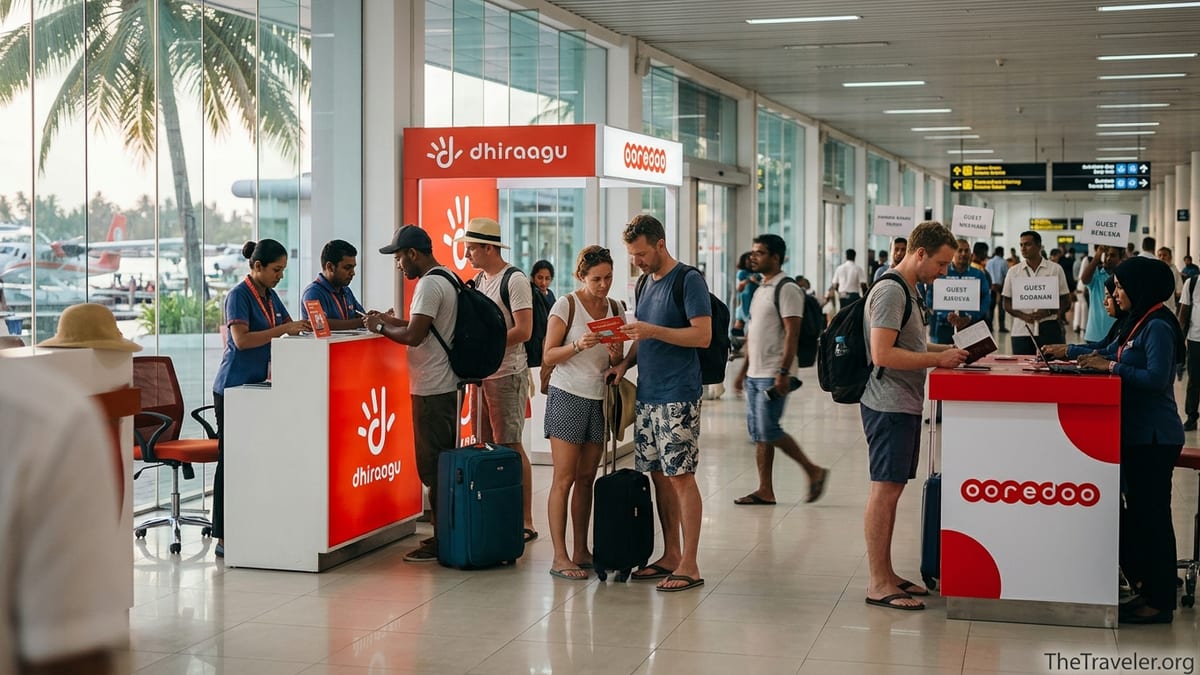
What to Expect on Arrival at Velana International Airport (MLE)
After your plane lands at Velana International Airport and you clear immigration and baggage claim, you will step into the public arrivals hall of the international terminal. This is where you will find the two Maldivian mobile operators that matter for tourists: Dhiraagu and Ooredoo. Both operate branded counters and, in Ooredoo’s case, also self service kiosks where you can pick up a SIM within minutes using your passport.
The counters are positioned along the walls of the arrivals area, close to where resort representatives hold signs and where you exit toward speedboat jetties and the seaplane terminal transfers. In practice, that means you can buy a SIM card or activate an eSIM while your resort host is organizing your transport or while you wait for a domestic flight to another island.
Staff at both counters are used to handling newly arrived tourists. They typically check your passport, offer a short menu of tourist plans in US dollars, and configure your phone for you. It is common for them to insert the SIM, scan a QR code for an eSIM, switch APN settings and even test a speed test app in front of you, so the whole process usually takes less than ten minutes if there is no queue.
Payment at the airport shops is straightforward. You can usually pay in US dollars cash or by major credit card. Prices are advertised in USD or in Maldivian rufiyaa with tax included, and the staff will convert for you if needed. Unlike in some countries, there is no haggling here; tourist SIM prices at MLE are standardized and clearly displayed on boards at the counters.
Dhiraagu Tourist SIM and eSIM: Packages and Practicalities
Dhiraagu is the historic national operator in the Maldives and runs a large share of the country’s mobile infrastructure. For visitors, it focuses on simple tourist packages that can be bought as either physical SIMs or eSIMs. At the time of writing, Dhiraagu sells tourist data bundles that are designed around heavy holiday use, such as 100 GB of data over 7 or 15 days for a flat fee in Maldivian rufiyaa. These bundles are add ons that sit on top of a basic tourist line, and they are prominently marketed both online and at the airport business center.
The airport process with Dhiraagu is straightforward. You present your passport, choose a tourist plan and decide whether you want an eSIM or plastic SIM. If you select a physical SIM, staff will usually insert it, register it in your name and activate your chosen data package on the spot. If your phone supports eSIM, they can instead issue a QR code and activate the eSIM digitally, which means you keep your home SIM in the device for calls or banking codes.
In terms of coverage, Dhiraagu generally has strong 4G coverage across the country and has been rolling out 5G in and around the capital region and selected islands. In real world terms, that means that on many resort islands you can expect speeds good enough for HD video calls, social media and cloud photo backups. In more remote atolls speeds may fluctuate, but most recent traveler reports suggest Dhiraagu is reliable in the majority of resort destinations and local guesthouse islands.
One important point is that tourists are usually limited to tourist products. While standard prepaid plans can sometimes be cheaper for long stays, Dhiraagu’s regular prepaid services tend to require Maldivian ID or a work visa. If you are arriving on a tourist visa, expect to be guided toward tourist SIM or tourist eSIM packages at the airport business center and at Dhiraagu shops in Male or Hulhumale.
Ooredoo Tourist SIM, Airport Offers and Kiosk Experience
Ooredoo Maldives is the main competitor to Dhiraagu and is very active in the tourist market. Its tourist portfolio currently includes clearly branded packages such as a 20 GB plan around 40 US dollars and a 100 GB plan around 50 US dollars with a 30 day validity. The higher tier package typically combines around 30 GB of “regular” data with about 70 GB earmarked for social media and popular apps, as well as a bundle of local voice minutes that you can use to call Maldivian numbers.
At Velana Airport, Ooredoo has a staffed shop plus self service kiosks that dispense free SIM starter kits which you then load with a tourist plan. The messaging in 2026 highlights that you can “land, connect and explore instantly,” and in practice that is not far from reality. Many travelers report that from walking up to the counter to having a fully functional data connection takes under five minutes, as activation is done electronically and does not require lengthy form filling beyond your passport details.
Ooredoo also offers tourist eSIMs. If you buy online before travel, you can receive an eSIM QR code by email or through a partner app and activate it as soon as your plane lands. If you prefer to decide on arrival, the airport staff can issue an eSIM instead of a plastic card as long as your phone is on the compatible list. For couples or groups, one popular strategy is for one person to buy the 100 GB tourist pack and then use hotspot tethering for the others, which Ooredoo generally allows on these plans.
Ooredoo markets one higher priced airport exclusive offer that has appeared in recent years. For example, there has been a 100 US dollar tourist plan sold only at the airport shop that combines 125 GB of data, voice minutes and a free portable MiFi device. This type of package can be attractive for families or groups traveling with Wi Fi only tablets or laptops, since the MiFi can sit in a beach bag and provide connectivity to multiple devices during boat rides or on excursions.
eSIM Alternatives Before You Fly: When They Make Sense
If you own a recent smartphone, you may prefer to arrange an eSIM before landing instead of queuing at the airport. Beyond Dhiraagu and Ooredoo’s own tourist eSIMs, there are regional and global providers that resell Maldivian connectivity in eSIM form. One example is a Maldivian based service that partners with both Dhiraagu and Ooredoo to offer digital tourist packs like 20 GB for 10 days or 100 GB for 30 days on a shared app controlled platform. These services typically cost roughly the same as buying direct from the operator at the airport, but they let you install the QR code and test activation ahead of time.
International eSIM brands that cover the Maldives often take a slightly different approach. Many do not use Dhiraagu or Ooredoo directly but rather route traffic via roaming agreements, which can mean higher latency and slightly less predictable speeds compared with a local SIM. Prices also vary significantly. In some cases, 10 GB for a week of Maldives data via a global eSIM provider can cost close to what Ooredoo charges for 100 GB on a direct tourist plan. For heavy users, a local tourist eSIM bought online from Dhiraagu or Ooredoo usually delivers better value per gigabyte.
That said, global eSIMs can still be useful in certain scenarios. If you land late at night and are transferring straight onto a domestic flight, having a preconfigured eSIM means you can call your guesthouse, receive airline SMS updates and order ride hailing in Hulhumale without hunting for an open counter. For frequent travelers who bounce between countries on a single trip, keeping one multi country eSIM active for light essential use and then adding a Maldivian tourist plan for heavy data can be a flexible compromise.
When assessing whether to rely solely on a non local eSIM, consider your expected data usage and how remote your resort is. For a short city style stay in Male where you only need messaging and maps, a small global eSIM pack may be enough. For a ten night overwater villa stay with constant photo uploads, streaming and video calls, connecting directly to Dhiraagu or Ooredoo via a local SIM or eSIM will almost always deliver better performance and value.
Resort and Guesthouse Wi Fi: How Much Can You Rely on It?
Many travelers assume they can skip a local SIM because “the resort has Wi Fi.” In the Maldives, that is usually true at a basic level, but the quality and coverage can vary dramatically. Higher end private island resorts have invested heavily in fiber backhaul or dedicated microwave links, and it is common to find solid Wi Fi in villas and public areas that supports HD streaming and video calls. On such islands, a tourist SIM becomes more of a backup for boat transfers and excursions rather than the main connection.
Mid range resorts and local guesthouses may advertise free Wi Fi, but in practice speeds can slow to a crawl in peak evening hours when everyone is on video calls, uploading drone footage or streaming. Some properties still rely on single consumer grade access points or shared broadband lines that were not designed for a fully booked hotel. In these cases, even a modest 20 or 40 GB tourist SIM can transform your experience by giving you consistent 4G or 5G data when the shared Wi Fi is congested.
Coverage is another consideration. It is common for resorts to have good Wi Fi around reception, bars and main pools but weaker or patchy signals inside beach villas, on sandbanks or during sunset cruises. If you plan to work remotely from your villa terrace, make bank transfers from your room, or call family during a sandbank picnic, having your own mobile connection via Dhiraagu or Ooredoo ensures you are not at the mercy of the resort network design.
Resort transfer days are a particular weak spot for Wi Fi. On arrival, you may spend time in the seaplane terminal, on a domestic flight, or on a speedboat moving between atolls. These legs often have no usable Wi Fi at all. A common real world example is a traveler landing at MLE and immediately boarding a 40 minute seaplane, then a 20 minute speedboat, with several hours before reaching a villa Wi Fi password. Tourists who bought a SIM at the airport are able to message family, coordinate with resort staff and check onward flights throughout that journey, while those relying only on resort Wi Fi remain offline until check in.
Prices, Value and Whether You Should Buy at MLE
Tourist SIM prices at Velana Airport are not the cheapest way to get mobile data in the Maldives, but they are transparent and convenient. As of mid 2026, entry level tourist packs from Ooredoo start around 40 US dollars for 20 GB of data over roughly 10 days, while the more popular plan is around 50 US dollars for up to 100 GB valid 30 days with a mix of regular and social data and several hundred minutes of local calls. Dhiraagu’s tourist offers sit in a similar range once converted from Maldivian rufiyaa, with some focusing solely on large data add ons of around 100 GB over one or two weeks.
In theory, a regular local prepaid SIM with add on data could be cheaper, and some online discussions mention trying to buy “standard” prepaid plans in Male or Hulhumale to avoid tourist pricing. In practice, most shops will ask for a Maldivian ID or a work permit to issue non tourist SIMs. Passport holders on tourist visas are usually steered back to tourist products. This means that for the typical visitor, the prices advertised at Velana Airport are close to what you will find at operator shops in the capital as well.
Whether you should buy at MLE comes down to your usage plans. If you are heading directly to a private island resort for a short holiday and are happy to rely on resort Wi Fi with your home SIM as backup for emergencies, you may not need a local SIM at all. If you are traveling on a budget, staying on local islands, using local ride hailing services that require a local number, or plan to use mobile banking and two factor authentication heavily, buying a tourist SIM at the airport is usually the most practical choice.
For many travelers, the sweet spot is a mid range tourist plan from either Dhiraagu or Ooredoo purchased on arrival, used heavily for the first days and for all transfers, and then supplemented by resort Wi Fi once you are settled in. Because even the mid tier plans now routinely include tens of gigabytes of data, you can comfortably back up photos, stream music and call home daily without micromanaging your usage.
Registration, Passport Requirements and Activation Tips
Maldivian regulations require SIM cards to be registered to an individual, and for tourists that means your passport is the primary form of identification. At Velana Airport, you can expect staff at Dhiraagu and Ooredoo counters to scan or photograph your passport and enter key details into their registration system before activating the SIM or eSIM. The process is quick, but it does mean you should keep your passport handy instead of packing it deep into a checked suitcase or bag.
Once registration is complete, activation is usually immediate. For physical SIMs, staff will often insert the card, wait for the network to recognize it and confirm data connectivity by opening a browser or messaging app. For eSIMs, you will be asked to scan a QR code from your phone screen or a small printed slip, then follow the prompts to add the new plan. Most modern phones will automatically configure the correct access point name, but if your data does not start working, staff can manually set the APN in your mobile network settings.
One practical tip is to check before travel that your phone is unlocked and supports the right bands for Maldivian networks. Most recent iPhones and Android flagships work out of the box, but some budget devices bought from carriers in other countries come locked or lack useful 4G bands. If you know you will need a stable connection for work, it is worth confirming device compatibility and unlock status with your home operator before you fly.
Another tip is to consider how you want to handle calls and messaging on your primary number. With dual SIM and eSIM setups, you can often keep your home line active for voice calls and bank verification codes while routing mobile data through the Maldivian SIM. At the airport counter, tell staff which SIM you intend to set as primary for data so they can help configure it correctly in your settings and avoid surprise roaming bills.
The Takeaway
Staying connected in the Maldives in 2026 is far simpler than it was even a few years ago. Velana International Airport is well set up for newly arrived visitors, with Dhiraagu and Ooredoo both offering straightforward tourist SIM and eSIM products right in the arrivals hall. While airport prices are not the very cheapest way anyone could access data in the country, for most tourists they are fair, hassle free and represent good value when you factor in the amount of data included.
For travelers who plan to spend their trip hopping between islands, working remotely, using local taxis and banking apps, or simply sharing a steady stream of photos and videos from overwater villas, buying a local connection at MLE is usually the most practical choice. For those on short, all inclusive resort stays who are content with villa Wi Fi, a local SIM becomes optional but still offers peace of mind during transfers and excursions.
Ultimately, the best strategy is to think about your connectivity needs before you fly, decide whether a local SIM, a tourist eSIM arranged in advance or a combination of resort Wi Fi and a global roaming plan suits you best, and then execute that plan calmly after landing. With a bit of preparation and a quick stop at the airport counters, you can step onto your speedboat or seaplane with maps, messaging and memories all seamlessly connected.
FAQ
Q1. Do I really need to buy a SIM card at Velana Airport, or can I wait?
For most short resort stays, you can technically rely on resort Wi Fi and skip a local SIM, but buying at the airport gives you connectivity during transfers, in Male or Hulhumale and on excursions. If you plan to use local ride hailing apps, contact guesthouses directly or work remotely, getting a SIM or eSIM at MLE is strongly recommended.
Q2. Which is better for tourists in the Maldives, Dhiraagu or Ooredoo?
Both operators offer good national coverage and dedicated tourist plans. Ooredoo is often praised for aggressive tourist data bundles like 100 GB packages, while Dhiraagu is valued for its long standing network presence. In practice, most travelers will be well served by either. If your hotel staff or recent reviews mention one network working noticeably better in your specific atoll, choose that one.
Q3. How much should I expect to pay for a tourist SIM or eSIM at Velana Airport?
As a rough guide in 2026, entry level tourist packs from the main operators start around 40 US dollars for about 20 GB of data, while popular mid tier options around 50 US dollars include up to 100 GB of data plus local call minutes. Higher priced packages with extras like a MiFi device cost more. Prices and exact data allowances can change, but this range is a useful benchmark.
Q4. Can I buy a cheaper regular prepaid SIM in Male or Hulhumale instead of a tourist SIM?
Most visitors on a tourist visa are limited to tourist products, whether at the airport or in town. Standard local prepaid SIMs in the Maldives usually require Maldivian ID or a work permit, so passport holders are typically directed back to tourist packages. For a typical holiday stay, you should plan around tourist pricing rather than relying on finding cheaper local only offers.
Q5. Is it better to use a global eSIM from home or a local Maldivian eSIM?
Global eSIMs are convenient for light use and multi country trips, but they often cost more per gigabyte and may offer lower speeds than local Maldivian eSIMs that connect directly to Dhiraagu or Ooredoo. If you expect heavy data use for photos, streaming and calls, a local tourist eSIM is usually better value. A hybrid approach using a small global eSIM for backup plus a local plan for heavy use works well for some travelers.
Q6. Will my resort’s Wi Fi be good enough for video calls and remote work?
On higher end private island resorts, Wi Fi is often strong enough for HD video calls, especially in villas and main public areas. On mid range resorts and guesthouses, speeds can slow during peak evening hours. If you must work reliably or join important calls, it is safer to have a local SIM or eSIM as a backup so you are not dependent on a single shared resort network.
Q7. Can I share my Maldivian tourist data with my partner or family via hotspot?
In most cases, yes. Both major operators generally allow tethering on tourist plans, and many visitors use one large data plan to supply Wi Fi to several phones or tablets. It is still wise to confirm at the counter that hotspot use is permitted on the specific package you choose and then test sharing once the SIM or eSIM is active.
Q8. What documents do I need to buy a SIM or eSIM at Velana Airport?
You will need your passport for registration. Staff at Dhiraagu and Ooredoo counters will scan or record your details in line with Maldivian regulations. You do not need local references, proof of address or a work permit for tourist products. Having your passport easily accessible in your hand luggage speeds up the process.
Q9. Will a Maldivian SIM work everywhere in the country, including remote islands?
Both Dhiraagu and Ooredoo have built extensive coverage across the inhabited atolls, and most resort and guesthouse islands have at least 4G service. In very remote areas or while crossing open ocean between atolls, coverage may drop temporarily. For the vast majority of popular tourist islands, however, a Maldivian SIM provides reliable data and voice service.
Q10. What if my phone is locked or does not support eSIM?
If your phone is locked to your home carrier, you may not be able to use a Maldivian physical SIM or eSIM. In that case, you can either rely on roaming from your home plan, use resort Wi Fi exclusively or bring an unlocked secondary device such as a spare smartphone or travel router. Before traveling, it is worth checking with your home operator whether your device can be unlocked and confirming whether it supports eSIM if you plan to go that route.